Technical SEO: Building Your Site in a Way That Stands Out!
Technical SEO: Building Your Site in a Way That Stands Out!
Technical SEO
Technical SEO
Technical SEO
Technical SEO ensures your website is easy for search engines to find, crawl, and understand by improving things like speed, mobile-friendliness, and site structure
Technical SEO ensures your website is easy for search engines to find, crawl, and understand by improving things like speed, mobile-friendliness, and site structure

Table of Content

Build a Search-Ready Website That Ranks and Performs






4.9/5 Ratings!

Krishna Dev
Krishna Dev
6 Min Read
6 Min Read
Oct 31, 2025
Oct 31, 2025
What is Technical SEO?
In the world of SEO, links and content are often the main focus. But there is a key part of every successful website that makes it easy for search engines to find, crawl, and index your pages. This approach is called Technical SEO.
It's important to learn technical SEO if you want your website to load faster, rank higher, and give users a positive experience. This article will explain technical SEO, its importance, what to focus on, and how to do it right.
In the world of SEO, links and content are often the main focus. But there is a key part of every successful website that makes it easy for search engines to find, crawl, and index your pages. This approach is called Technical SEO.
It's important to learn technical SEO if you want your website to load faster, rank higher, and give users a positive experience. This article will explain technical SEO, its importance, what to focus on, and how to do it right.
What does the Term "Technical SEO" mean?
Technical SEO is the process of making your website's backend and infrastructure better so that it shows up higher in search engine results pages (SERPs) and works better. It is all about making sure that search engines can easily crawl, index, and understand your site.
Technical SEO is little different from on-page SEO, which improves content, and off-page SEO, which builds backlinks. Technical SEO looks at things like site architecture, speed, security, and other technical difficulties that can affect your site's health and ranking potential.
Technical SEO is the process of making your website's backend and infrastructure better so that it shows up higher in search engine results pages (SERPs) and works better. It is all about making sure that search engines can easily crawl, index, and understand your site.
Technical SEO is little different from on-page SEO, which improves content, and off-page SEO, which builds backlinks. Technical SEO looks at things like site architecture, speed, security, and other technical difficulties that can affect your site's health and ranking potential.
Why Technical SEO Matters?
1. Makes it easier for search engines to crawl and index your site
No matter how excellent your content is, it won't show up in search results if search engines can't crawl your site properly. Technical SEO makes sure that bots can easily find their way around your site.
No matter how excellent your content is, it won't show up in search results if search engines can't crawl your site properly. Technical SEO makes sure that bots can easily find their way around your site.
2. Makes the user experience better
Websites that load quickly, work well on mobile devices, and are simple to navigate keep visitors interested, which lowers bounce rates and tells search engines that the site is high quality.
Websites that load quickly, work well on mobile devices, and are simple to navigate keep visitors interested, which lowers bounce rates and tells search engines that the site is high quality.
Google gives websites that put speed, mobile usability, security, and structured data first a higher ranking. A site that works well from a technical perspective is more likely to rank higher.
Google gives websites that put speed, mobile usability, security, and structured data first a higher ranking. A site that works well from a technical perspective is more likely to rank higher.
4. It stops problems with duplicate content.
Setting things up correctly makes sure that URLs are unique and stops duplicate content, which can confuse search engines and make ranking signals less clear.
Setting things up correctly makes sure that URLs are unique and stops duplicate content, which can confuse search engines and make ranking signals less clear.
Important Parts of Technical SEO
1. Website Speed and Performance
A fast-loading website improves both user experience and SEO rankings.
Compress images and videos without losing quality.
Minify CSS, JavaScript, and HTML files.
Use a Content Delivery Network (CDN) and enable browser caching.
Choose a reliable hosting provider to prevent downtime.
1. Website Speed and Performance
A fast-loading website improves both user experience and SEO rankings.
Compress images and videos without losing quality.
Minify CSS, JavaScript, and HTML files.
Use a Content Delivery Network (CDN) and enable browser caching.
Choose a reliable hosting provider to prevent downtime.
With Google’s mobile-first indexing, your mobile site is now the primary version considered for ranking.
Use responsive design that adapts to all screen sizes.
Keep navigation simple and touch-friendly.
Avoid intrusive pop-ups or interstitials.
3. Site Security (HTTPS)
Google favors secure websites.
Install an SSL certificate and redirect all HTTP pages to HTTPS.
Regularly check your site for security vulnerabilities.
4. Crawlability and Indexing
Help search engines discover and understand your content.
Use a clean robots.txt file to control which pages get crawled.
Submit an XML sitemap to Google Search Console.
Fix broken links and eliminate orphan pages.
5. URL Structure and Site Architecture
Organize your site in a way that’s easy to navigate.
Keep URLs short, descriptive, and keyword-rich.
Use logical categories and subfolders.
Add breadcrumb navigation for better usability.
6. Structured Data (Schema Markup)
Schema markup helps search engines interpret your content and display rich results.
Add markup for reviews, products, FAQs, or events using the JSON-LD format recommended by Google.
7. Canonicalization and Duplicate Content
Avoid confusion and lost rankings due to duplicate content.
Use canonical tags to specify the preferred page version.
Prevent multiple URLs for the same content (e.g., with and without “www”).
8. Fixing mistakes and redirects
Review your site for any 404 errors (page not found) and address them accordingly.
301 redirects can be used to permanently send old URLs to the right pages.
Don't use redirect chains or loops.
With Google’s mobile-first indexing, your mobile site is now the primary version considered for ranking.
Use responsive design that adapts to all screen sizes.
Keep navigation simple and touch-friendly.
Avoid intrusive pop-ups or interstitials.
3. Site Security (HTTPS)
Google favors secure websites.
Install an SSL certificate and redirect all HTTP pages to HTTPS.
Regularly check your site for security vulnerabilities.
4. Crawlability and Indexing
Help search engines discover and understand your content.
Use a clean robots.txt file to control which pages get crawled.
Submit an XML sitemap to Google Search Console.
Fix broken links and eliminate orphan pages.
5. URL Structure and Site Architecture
Organize your site in a way that’s easy to navigate.
Keep URLs short, descriptive, and keyword-rich.
Use logical categories and subfolders.
Add breadcrumb navigation for better usability.
6. Structured Data (Schema Markup)
Schema markup helps search engines interpret your content and display rich results.
Add markup for reviews, products, FAQs, or events using the JSON-LD format recommended by Google.
7. Canonicalization and Duplicate Content
Avoid confusion and lost rankings due to duplicate content.
Use canonical tags to specify the preferred page version.
Prevent multiple URLs for the same content (e.g., with and without “www”).
8. Fixing mistakes and redirects
Review your site for any 404 errors (page not found) and address them accordingly.
301 redirects can be used to permanently send old URLs to the right pages.
Don't use redirect chains or loops.
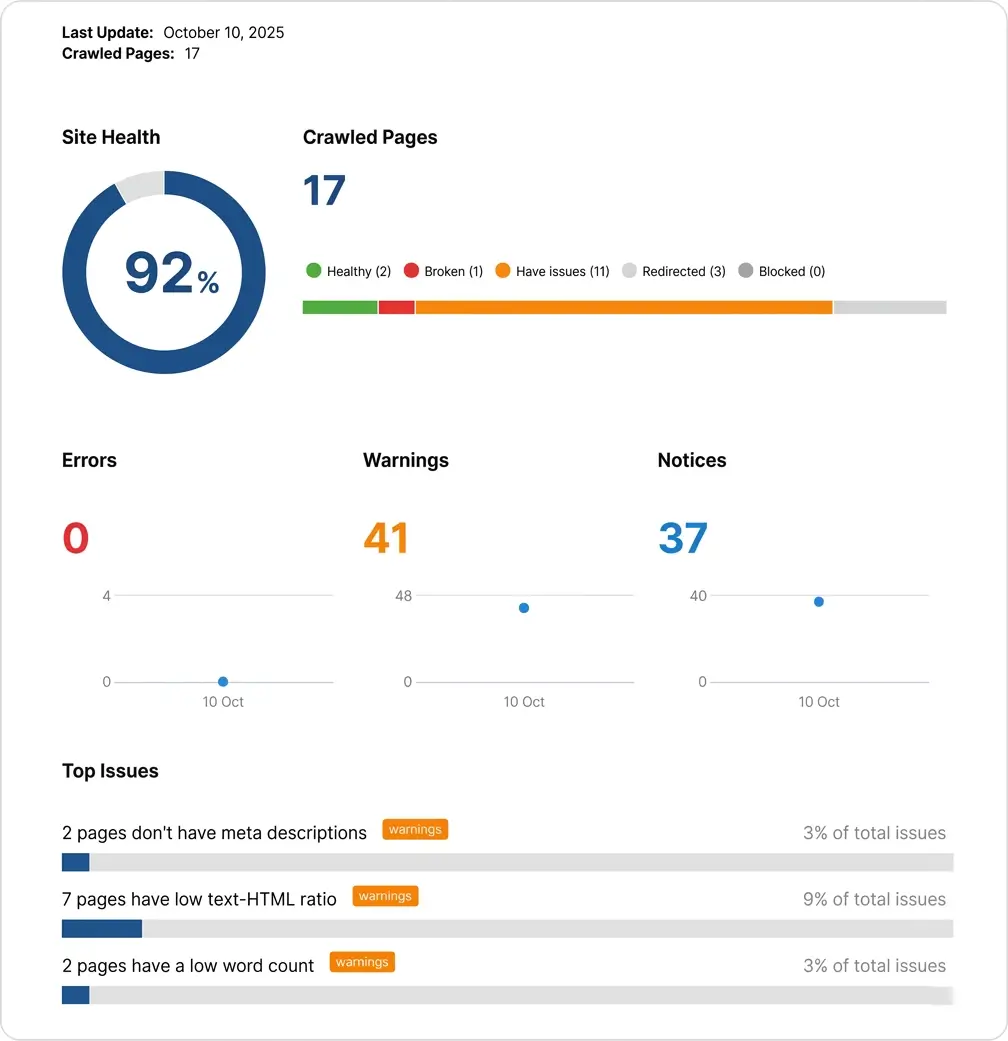
How to Do a Technical SEO Audit?
Task
Task
Task
Task
What to Check / Why It Matters
What to Check / Why It Matters
What to Check / Why It Matters
What to Check / Why It Matters
Crawl the Website
Crawl the Website
Crawl the Website
Find errors, redirects, broken links, and technical issues using tools like Screaming Frog or GSC.
Find errors, redirects, broken links, and technical issues using tools like Screaming Frog or GSC.
Find errors, redirects, broken links, and technical issues using tools like Screaming Frog or GSC.
Check Indexing
Check Indexing
Check Indexing
Ensure important pages are indexed in Google Search Console and nothing crucial is blocked.
Ensure important pages are indexed in Google Search Console and nothing crucial is blocked.
Ensure important pages are indexed in Google Search Console and nothing crucial is blocked.
Review Page Speed & Core Web Vitals
Review Page Speed & Core Web Vitals
Review Page Speed & Core Web Vitals
Use PageSpeed Insights/Lighthouse to improve speed, UX, and rankings.
Use PageSpeed Insights/Lighthouse to improve speed, UX, and rankings.
Use PageSpeed Insights/Lighthouse to improve speed, UX, and rankings.
Analyze URL Structure
Analyze URL Structure
Analyze URL Structure
Keep URLs clean, descriptive, and SEO-friendly for better crawling and relevance.
Keep URLs clean, descriptive, and SEO-friendly for better crawling and relevance.
Keep URLs clean, descriptive, and SEO-friendly for better crawling and relevance.
Fix Broken Links
Fix Broken Links
Fix Broken Links
Remove/redirect 404s and broken internal/external links to protect user experience and SEO.
Remove/redirect 404s and broken internal/external links to protect user experience and SEO.
Remove/redirect 404s and broken internal/external links to protect user experience and SEO.
Review XML Sitemap
Review XML Sitemap
Review XML Sitemap
Ensure it's updated, error-free, and submitted to search engines.
Ensure it's updated, error-free, and submitted to search engines.
Ensure it's updated, error-free, and submitted to search engines.
Check Robots.txt
Check Robots.txt
Check Robots.txt
Make sure important pages are crawlable and not blocked accidentally.
Make sure important pages are crawlable and not blocked accidentally.
Make sure important pages are crawlable and not blocked accidentally.
Audit Canonical Tags
Audit Canonical Tags
Audit Canonical Tags
Verify proper canonical tags to prevent duplicate content issues.
Verify proper canonical tags to prevent duplicate content issues.
Verify proper canonical tags to prevent duplicate content issues.
Check Mobile-Friendliness
Check Mobile-Friendliness
Check Mobile-Friendliness
Ensure site is mobile-friendly using Google tools for better mobile rankings.
Ensure site is mobile-friendly using Google tools for better mobile rankings.
Ensure site is mobile-friendly using Google tools for better mobile rankings.
Review HTTPS & Security
Review HTTPS & Security
Review HTTPS & Security
Check SSL setup and remove mixed content for trust and ranking signals.
Check SSL setup and remove mixed content for trust and ranking signals.
Check SSL setup and remove mixed content for trust and ranking signals.
Validate Structured Data
Validate Structured Data
Validate Structured Data
Test schema markup to enhance visibility and rich snippet eligibility.
Test schema markup to enhance visibility and rich snippet eligibility.
Test schema markup to enhance visibility and rich snippet eligibility.
Audit Internal Links
Audit Internal Links
Audit Internal Links
Improve linking structure, avoid orphan pages, and strengthen crawl paths.
Improve linking structure, avoid orphan pages, and strengthen crawl paths.
Improve linking structure, avoid orphan pages, and strengthen crawl paths.
Check for Duplicate Content
Check for Duplicate Content
Check for Duplicate Content
Identify duplicate pages to avoid keyword cannibalization.
Identify duplicate pages to avoid keyword cannibalization.
Identify duplicate pages to avoid keyword cannibalization.
Review Core Pages
Review Core Pages
Review Core Pages
Make sure key landing pages are optimized, fast, and relevant.
Make sure key landing pages are optimized, fast, and relevant.
Make sure key landing pages are optimized, fast, and relevant.
Review Hosting & Server
Review Hosting & Server
Review Hosting & Server
Check uptime and server response time to ensure a stable and fast website.
Check uptime and server response time to ensure a stable and fast website.
Check uptime and server response time to ensure a stable and fast website.
Final Thoughts
Technical SEO may not be flashy, but it’s the foundation of a successful website. Even the best content won’t perform well if search engines can’t access, understand, or trust your site.
By improving your site’s speed, security, mobile performance, and crawlability, you create a better experience for both users and search engines — setting your business up for long-term growth and higher rankings.
Technical SEO may not be flashy, but it’s the foundation of a successful website. Even the best content won’t perform well if search engines can’t access, understand, or trust your site.
By improving your site’s speed, security, mobile performance, and crawlability, you create a better experience for both users and search engines — setting your business up for long-term growth and higher rankings.
Frequently Asked Questions (FAQs)
Frequently Asked Questions
How do I check if my website has technical SEO issues?

You can use tools like Google Search Console, GTmetrix, PageSpeed Insights, and Screaming Frog to find errors, speed issues, and indexing problems.
How important is mobile friendliness for technical SEO today?
You should expect a structured process that includes onboarding, goal setting, strategy development, regular communication, execution of campaigns, and performance reporting. A good agency will act as a partner collaborating with you to understand your business, crafting a custom plan, and keeping you informed about progress and results.
How often should I perform a technical SEO audit?
Vanity metrics are data points that look impressive but don’t directly impact your bottom line, such as social media likes, page views, or email open rates. While they can indicate visibility, they’re not strong indicators of business success. What’s more important are actionable metrics like lead quality, conversion rate, and return on investment (ROI). Looking for more details? Contact us today before your competitors do.
Why isn’t my site getting indexed by Google even though it’s live?
High traffic without conversions often points to deeper issues such as: Poor targeting (the wrong audience is visiting), weak calls-to-action or unclear messaging, website usability issues or slow load times, lack of trust signals (like reviews or security).
Your marketing should not just drive visits; it should drive the right visitors and guide them to act.
Why does Google index one version of my page but ignore others?
You’ll know it’s working when you see measurable progress toward your business goals, more qualified leads, better engagement, increased sales, or stronger ROI. Regular reports, clear KPIs, and consistent communication from your agency are key to evaluating success.
What is crawl budget and how do I optimize it?
Organic marketing (like SEO, blogging, and social media engagement) often takes 3 to 6 months to start showing results and may take 6–12 months for significant impact. It builds trust and authority over time, and while slower than paid marketing, it often yields more sustainable growth.
Does HTTPS improve SEO?
A good marketing report should cover: Key performance indicators (KPIs) tied to your goals, traffic and conversion data, campaign performance summaries, ROI or cost-per-lead/acquisition, insights and recommendations for improvement, clear next steps or action items.
It should be easy to understand, jargon-free, and focus on outcomes. Learn more—how we drive revenue?
How do I check if my website has technical SEO issues?
You can use tools like Google Search Console, GTmetrix, PageSpeed Insights, and Screaming Frog to find errors, speed issues, and indexing problems.
How important is mobile friendliness for technical SEO today?
You should expect a structured process that includes onboarding, goal setting, strategy development, regular communication, execution of campaigns, and performance reporting. A good agency will act as a partner collaborating with you to understand your business, crafting a custom plan, and keeping you informed about progress and results.
How often should I perform a technical SEO audit?
Vanity metrics are data points that look impressive but don’t directly impact your bottom line, such as social media likes, page views, or email open rates. While they can indicate visibility, they’re not strong indicators of business success. What’s more important are actionable metrics like lead quality, conversion rate, and return on investment (ROI). Looking for more details? Contact us today before your competitors do.
Why isn’t my site getting indexed by Google even though it’s live?
High traffic without conversions often points to deeper issues such as: Poor targeting (the wrong audience is visiting), weak calls-to-action or unclear messaging, website usability issues or slow load times, lack of trust signals (like reviews or security).
Your marketing should not just drive visits; it should drive the right visitors and guide them to act.
Why does Google index one version of my page but ignore others?
You’ll know it’s working when you see measurable progress toward your business goals, more qualified leads, better engagement, increased sales, or stronger ROI. Regular reports, clear KPIs, and consistent communication from your agency are key to evaluating success.
What is crawl budget and how do I optimize it?
Organic marketing (like SEO, blogging, and social media engagement) often takes 3 to 6 months to start showing results and may take 6–12 months for significant impact. It builds trust and authority over time, and while slower than paid marketing, it often yields more sustainable growth.
Does HTTPS improve SEO?
A good marketing report should cover: Key performance indicators (KPIs) tied to your goals, traffic and conversion data, campaign performance summaries, ROI or cost-per-lead/acquisition, insights and recommendations for improvement, clear next steps or action items.
It should be easy to understand, jargon-free, and focus on outcomes. Learn more—how we drive revenue?
Build a Search-Ready Website That Ranks and Performs
Build a Search-Ready Website That Ranks and Performs
Technical SEO Makes Your Site Crawlable, Fast, & Secure.
Improve site performance, fix technical issues & enhance structure to boost visibility and strengthen SEO results.
Improve site performance, fix technical issues & enhance structure to boost visibility and strengthen SEO results.
4.9/5 Ratings!
4.9/5 Ratings!
Share this article
Share this article

Related Resources
Latest Blogs





Don’t miss our revenue growth tips!
Don’t miss our revenue growth tips!
Get expert marketing tips—straight to your inbox, like thousands of happy clients.
Get expert marketing tips—straight to your inbox, like thousands of happy clients.
Latest Blogs



























Ready to speak with an expert?
Data-Driven Marketing Agency That Elevates ROI
1100+
Websites Designed & Optimized to Convert
$280M+
Client Revenue Driven & Growing Strong
Discover how to skyrocket
your revenue today!


Trusted by 1000+ Owners!
Ready to speak with an expert?
Data-Driven Marketing Agency That Elevates ROI
1100+
Websites Designed & Optimized to Convert
$280M+
Client Revenue Driven & Growing Strong
Discover how to skyrocket
your revenue today!
Trusted by 1000+ Owners!
Want to skyrocket revenue?
4.9/5 Ratings!
Ready to speak with an expert?
Data-Driven Marketing Agency That Elevates ROI
1100+
Websites Designed & Optimized to Convert
$280M+
Client Revenue Driven & Growing Strong
Want to skyrocket
revenue?
Trusted by 1000+ Owners!
Call
Meet