What is Robots.txt & How it Guides Search Engines?
What is Robots.txt & How it Guides Search Engines?
What is Robots.txt & How it Guides Search Engines?
What is Robots.txt & How it Guides Search Engines?
What is Robots.txt & How it Guides Search Engines?
Robots.txt
Robots.txt
Robots.txt
Robots.txt
Robots.txt
A website's robots.txt file tells search engine crawlers which pages or directories they can access. This keeps them from crawling the whole site.
A website's robots.txt file tells search engine crawlers which pages or directories they can access. This keeps them from crawling the whole site.
A website's robots.txt file tells search engine crawlers which pages or directories they can access. This keeps them from crawling the whole site.
A website's robots.txt file tells search engine crawlers which pages or directories they can access. This keeps them from crawling the whole site.

Table Of Content

Table Of Content
Table Of Content
Table Of Content
Table of Content

Robots.txt tells search engines which pages to crawl or skip.







4.9/5 Ratings!
4.9/5 Ratings!

Kunal T.
Kunal T.
Kunal T.
6 Min Read
6 Min Read
6 Min Read
OCT 30, 2025
OCT 30, 2025
OCT 30, 2025
What is Robots.txt, and What is its Basic Purpose?
What is Robots.txt, and What is its Basic Purpose?
What is Robots.txt, and What is its Basic Purpose?
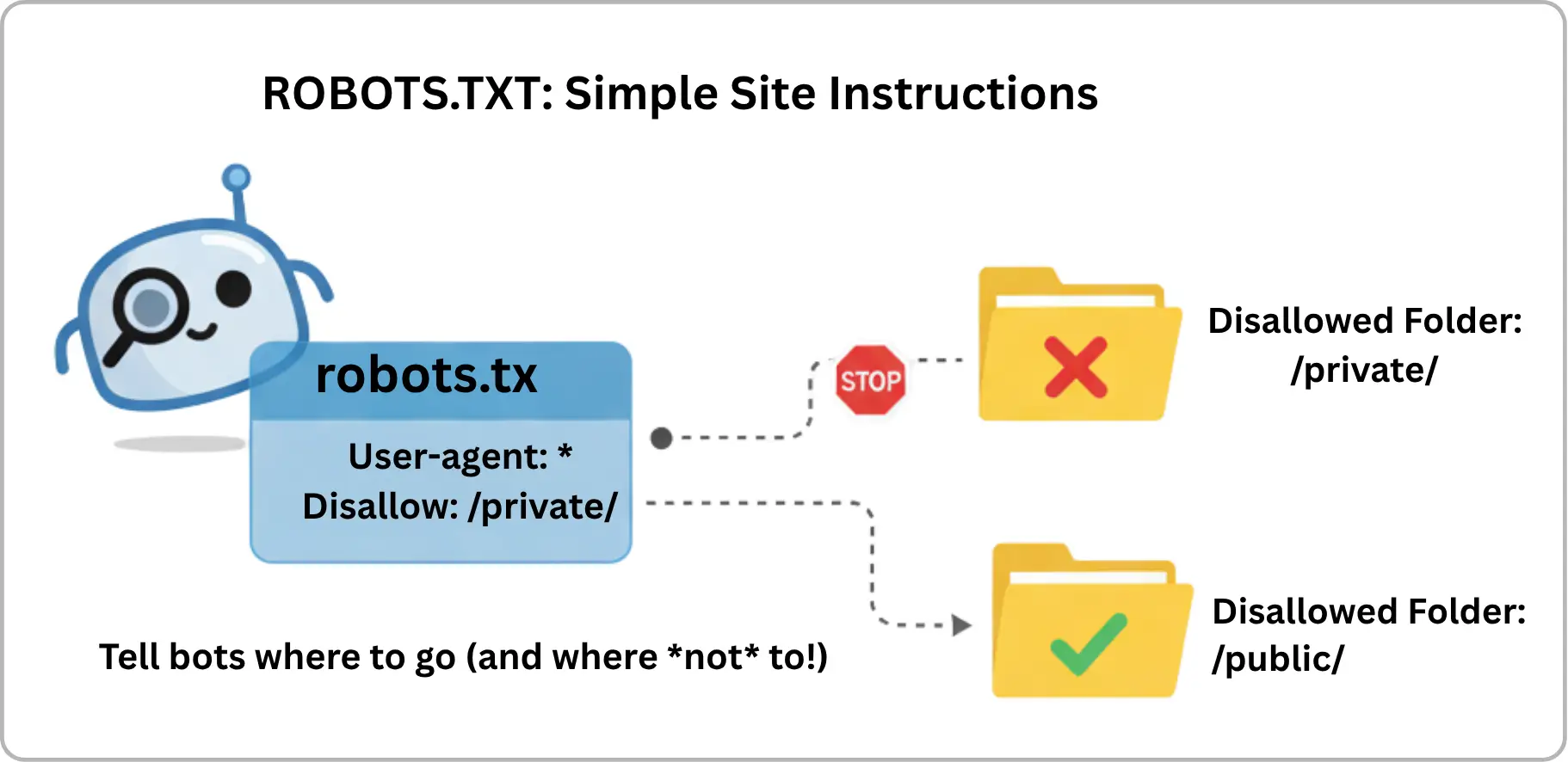
A robots.txt file is used to communicate to web crawlers like Googlebot and Bingbot as to which sections of a website they are permitted to visit and which sections they should avoid visiting. One of the first files that web crawlers examine is this one, and it is stored in the primary folder of your website.
A robots.txt file is used to communicate to web crawlers like Googlebot and Bingbot as to which sections of a website they are permitted to visit and which sections they should avoid visiting. One of the first files that web crawlers examine is this one, and it is stored in the primary folder of your website.
A robots.txt file is used to communicate to web crawlers like Googlebot and Bingbot as to which sections of a website they are permitted to visit and which sections they should avoid visiting. One of the first files that web crawlers examine is this one, and it is stored in the primary folder of your website.
How Robots.txt Guides Search Engines?
How Robots.txt Guides Search Engines?
How Robots.txt Guides Search Engines?
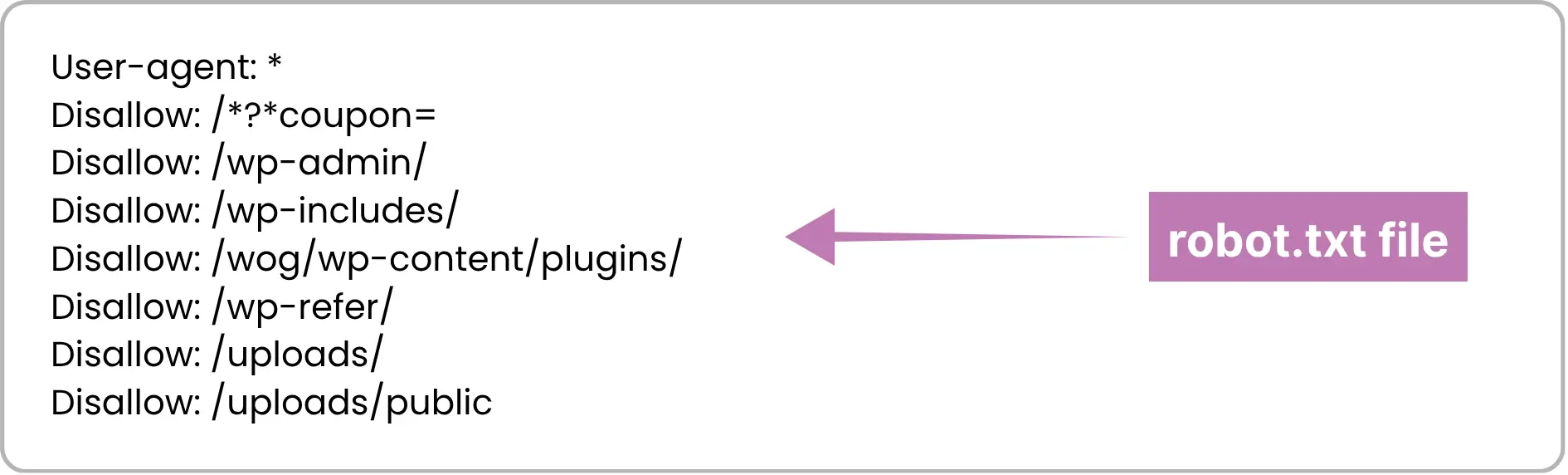
When a search engine gets to your site, it will first look at the robots.txt file before it starts to crawl.
User-agent: shows the crawler that the rule is made for. It could be Googlebot, Bingbot are for all bots.
Disallow: keeps bots out of named folders or pages such as /admin/ or /checkout/.
Allow: lets bots go into places that could be closed off otherwise.
If there is no robots.txt file, the crawlers think they can look at all parts of the site.
When a search engine gets to your site, it will first look at the robots.txt file before it starts to crawl.
User-agent: shows the crawler that the rule is made for. It could be Googlebot, Bingbot are for all bots.
Disallow: keeps bots out of named folders or pages such as /admin/ or /checkout/.
Allow: lets bots go into places that could be closed off otherwise.
If there is no robots.txt file, the crawlers think they can look at all parts of the site.
When a search engine gets to your site, it will first look at the robots.txt file before it starts to crawl.
User-agent: shows the crawler that the rule is made for. It could be Googlebot, Bingbot are for all bots.
Disallow: keeps bots out of named folders or pages such as /admin/ or /checkout/.
Allow: lets bots go into places that could be closed off otherwise.
If there is no robots.txt file, the crawlers think they can look at all parts of the site.
Difference Between Robots.txt & Meta Robots Tags
Difference Between Robots.txt & Meta Robots Tags
Difference Between Robots.txt & Meta Robots Tags
Aspect
Robots.txt
Meta Robots Tag
Control Level
Directory/URL level
Individual page level
Primary Purpose
Controls crawling
Controls crawling and indexing
Blocking Access
Prevents bots from accessing content
Doesn’t block access
Indexing Control
No indexing control
Can stop pages from being indexed
Requires Crawling
No, applied before crawling
Yes, must be crawled first
Bot Behavior
Can be ignored by bad bots
Recognized by most crawlers once accessed
How Search Engines Interpret Robots.txt: Crawling vs Indexing?
How Search Engines Interpret Robots.txt: Crawling vs Indexing?
How Search Engines Interpret Robots.txt: Crawling vs Indexing?
Search engines perform two main tasks:
Crawling: This is when search engines go to web pages. They find and follow links on these pages to look for more pages.
Indexing: In this step, search engines keep those pages and check what is on them. They use this information to show the right pages in search results.
Robots.txt is used to control which pages bots visit. It stops bots from going to some pages. It does not delete or take away things that have already been added to search engines.
Search engines perform two main tasks:
Crawling: This is when search engines go to web pages. They find and follow links on these pages to look for more pages.
Indexing: In this step, search engines keep those pages and check what is on them. They use this information to show the right pages in search results.
Robots.txt is used to control which pages bots visit. It stops bots from going to some pages. It does not delete or take away things that have already been added to search engines.
Search engines perform two main tasks:
Crawling: This is when search engines go to web pages. They find and follow links on these pages to look for more pages.
Indexing: In this step, search engines keep those pages and check what is on them. They use this information to show the right pages in search results.
Robots.txt is used to control which pages bots visit. It stops bots from going to some pages. It does not delete or take away things that have already been added to search engines.
Step-by-Step Guide to Creating and Implementing robots.txt
Step-by-Step Guide to Creating and Implementing robots.txt
Step-by-Step Guide to Creating and Implementing robots.txt
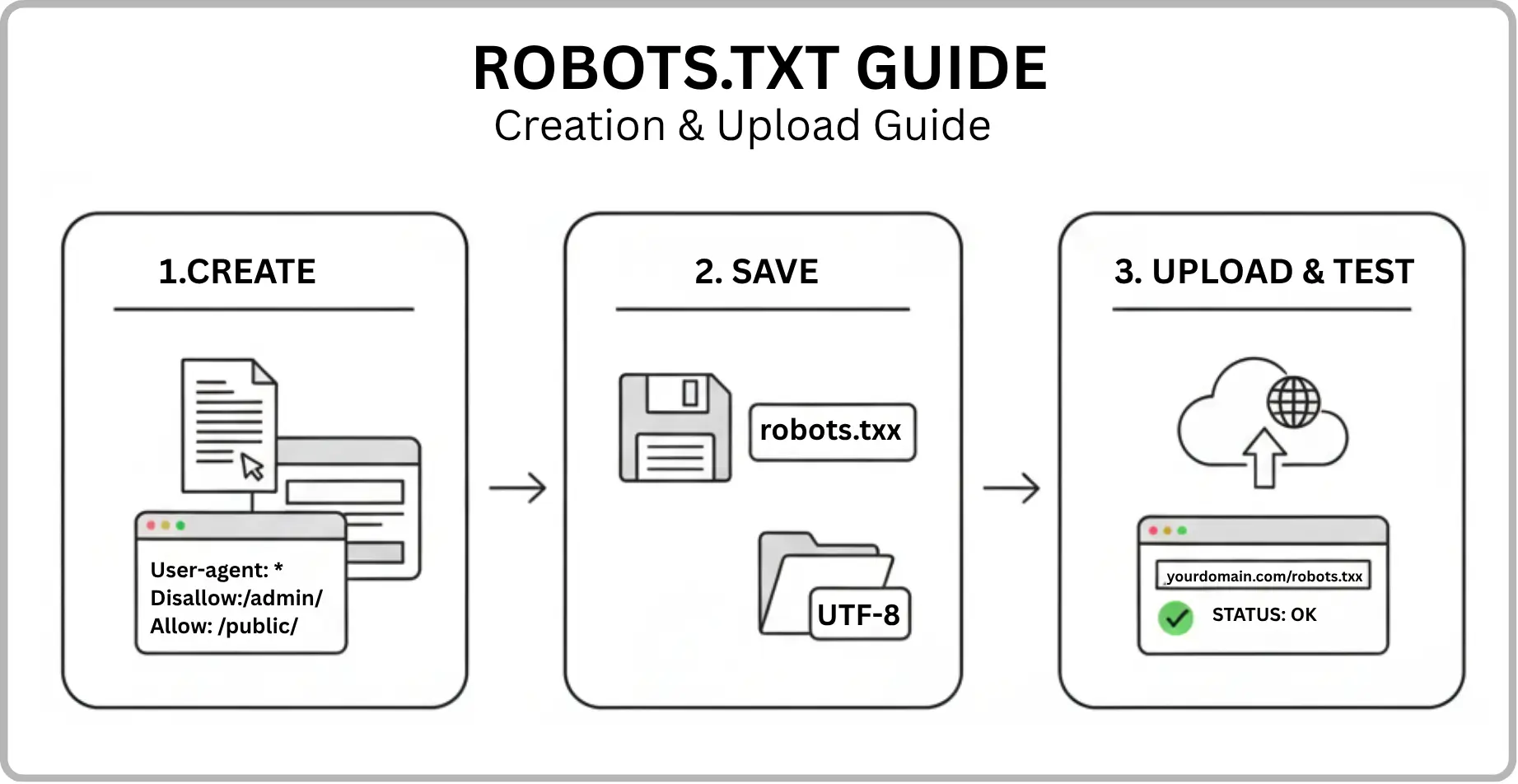
1. Create the file: Open a text editor and name it robots.txt.
2. Add rules: Use User-agent, Disallow, and Allow lines. These help you say what parts bots can see on your site.
3. Save properly: Save the file as UTF-8.
4. Upload: Put the file in the root folder of your website (for example, yourdomain.com/robots.txt).
5. Test: Go to Google Search Console and use the robots.txt Tester. This lets you find any problems right away.
1. Create the file: Open a text editor and name it robots.txt.
2. Add rules: Use User-agent, Disallow, and Allow lines. These help you say what parts bots can see on your site.
3. Save properly: Save the file as UTF-8.
4. Upload: Put the file in the root folder of your website (for example, yourdomain.com/robots.txt).
5. Test: Go to Google Search Console and use the robots.txt Tester. This lets you find any problems right away.
3. Make Power That Can't Be Questioned
This is what AEO is based on. Why should an AI trust what you write? Show off your E-E-A-T.
• Experience: Write from a place of doing things instead of just thinking about them.
• Expertise: Show your qualifications, licenses, or deep knowledge.
• Authoritativeness: Build a name for yourself in your field and gain links from trusted websites.
• Reliability: Be honest, give credit where credit is due, and maintain your website open and honest.
1. Create the file: Open a text editor and name it robots.txt.
2. Add rules: Use User-agent, Disallow, and Allow lines. These help you say what parts bots can see on your site.
3. Save properly: Save the file as UTF-8.
4. Upload: Put the file in the root folder of your website (for example, yourdomain.com/robots.txt).
5. Test: Go to Google Search Console and use the robots.txt Tester. This lets you find any problems right away.
Common Robots.txt Errors and How to Fix Them
Common Robots.txt Errors and How to Fix Them
Common Robots.txt Errors and How to Fix Them
Wrong location: Always put it in the site’s main folder.
Overusing wildcards: If you use * the wrong way, you can block large parts by mistake.
Using “noindex” in robots.txt: Google does not support this now—use meta tags instead.
Blocking CSS or JS: Do not block important files, or it can hurt how the site shows up in search.
Incorrect slashes (/): Make sure paths to folders are correct.
No testing: Always check your file after you update it so you do not get SEO problems.
Wrong location: Always put it in the site’s main folder.
Overusing wildcards: If you use * the wrong way, you can block large parts by mistake.
Using “noindex” in robots.txt: Google does not support this now—use meta tags instead.
Blocking CSS or JS: Do not block important files, or it can hurt how the site shows up in search.
Incorrect slashes (/): Make sure paths to folders are correct.
No testing: Always check your file after you update it so you do not get SEO problems.
3. Make Power That Can't Be Questioned
This is what AEO is based on. Why should an AI trust what you write? Show off your E-E-A-T.
• Experience: Write from a place of doing things instead of just thinking about them.
• Expertise: Show your qualifications, licenses, or deep knowledge.
• Authoritativeness: Build a name for yourself in your field and gain links from trusted websites.
• Reliability: Be honest, give credit where credit is due, and maintain your website open and honest.
Wrong location: Always put it in the site’s main folder.
Overusing wildcards: If you use * the wrong way, you can block large parts by mistake.
Using “noindex” in robots.txt: Google does not support this now—use meta tags instead.
Blocking CSS or JS: Do not block important files, or it can hurt how the site shows up in search.
Incorrect slashes (/): Make sure paths to folders are correct.
No testing: Always check your file after you update it so you do not get SEO problems.
Robots.txt & AI-Driven Search
Robots.txt & AI-Driven Search
Robots.txt & AI-Driven Search
Robots.txt is not only used by regular search engines now. It also matters for Artificial Intelligence (AI) tools like ChatGPT, Claude, and Perplexity. These AI crawlers look at the robots.txt file before they read a website.
Letting AI crawlers scan your pages can help your content show up in answers made by AI. This may help more people see it and trust it. If you block these crawlers, then it might be harder for your content to show up when people use AI search. Still, you can keep things private or stop the crawlers from reaching content that is repeated.
Why AI-based crawler's matter?
They put web content in order for AI search.
They care about meaning and do not just use keywords.
They help get new visits from AI platforms.
Robots.txt is not only used by regular search engines now. It also matters for Artificial Intelligence (AI) tools like ChatGPT, Claude, and Perplexity. These AI crawlers look at the robots.txt file before they read a website.
Letting AI crawlers scan your pages can help your content show up in answers made by AI. This may help more people see it and trust it. If you block these crawlers, then it might be harder for your content to show up when people use AI search. Still, you can keep things private or stop the crawlers from reaching content that is repeated.
Why AI-based crawler's matter?
They put web content in order for AI search.
They care about meaning and do not just use keywords.
They help get new visits from AI platforms.
Robots.txt is not only used by regular search engines now. It also matters for Artificial Intelligence (AI) tools like ChatGPT, Claude, and Perplexity. These AI crawlers look at the robots.txt file before they read a website.
Letting AI crawlers scan your pages can help your content show up in answers made by AI. This may help more people see it and trust it. If you block these crawlers, then it might be harder for your content to show up when people use AI search. Still, you can keep things private or stop the crawlers from reaching content that is repeated.
Why AI-based crawler's matter?
They put web content in order for AI search.
They care about meaning and do not just use keywords.
They help get new visits from AI platforms.
How Robots.txt Rules Influence AI Crawler Behavior?
How Robots.txt Rules Influence AI Crawler Behavior?
How Robots.txt Rules Influence AI Crawler Behavior?
AI crawlers look at the robots.txt file to see which pages they are allowed to read. A good robots.txt file helps keep private things safe. It also lets other people find useful content.
AI crawlers look at the robots.txt file to see which pages they are allowed to read. A good robots.txt file helps keep private things safe. It also lets other people find useful content.
AI crawlers look at the robots.txt file to see which pages they are allowed to read. A good robots.txt file helps keep private things safe. It also lets other people find useful content.
How Robots.txt Impacts SEO & Rankings?
How Robots.txt Impacts SEO & Rankings?
How Robots.txt Impacts SEO & Rankings?
Robots.txt helps with SEO. It does not make your pages rank higher on its own. But it helps search engines look at your most important pages by:
Blocking content that is not needed or content that repeats.
Saving crawl budget so search engines use it on work that matters.
Stopping admin or test pages from showing up in search.
Smart robots.txt management helps search engines crawl your site in a better way. This means your SEO can get stronger as time goes on.
Robots.txt helps with SEO. It does not make your pages rank higher on its own. But it helps search engines look at your most important pages by:
Blocking content that is not needed or content that repeats.
Saving crawl budget so search engines use it on work that matters.
Stopping admin or test pages from showing up in search.
Smart robots.txt management helps search engines crawl your site in a better way. This means your SEO can get stronger as time goes on.
Robots.txt helps with SEO. It does not make your pages rank higher on its own. But it helps search engines look at your most important pages by:
Blocking content that is not needed or content that repeats.
Saving crawl budget so search engines use it on work that matters.
Stopping admin or test pages from showing up in search.
Smart robots.txt management helps search engines crawl your site in a better way. This means your SEO can get stronger as time goes on.
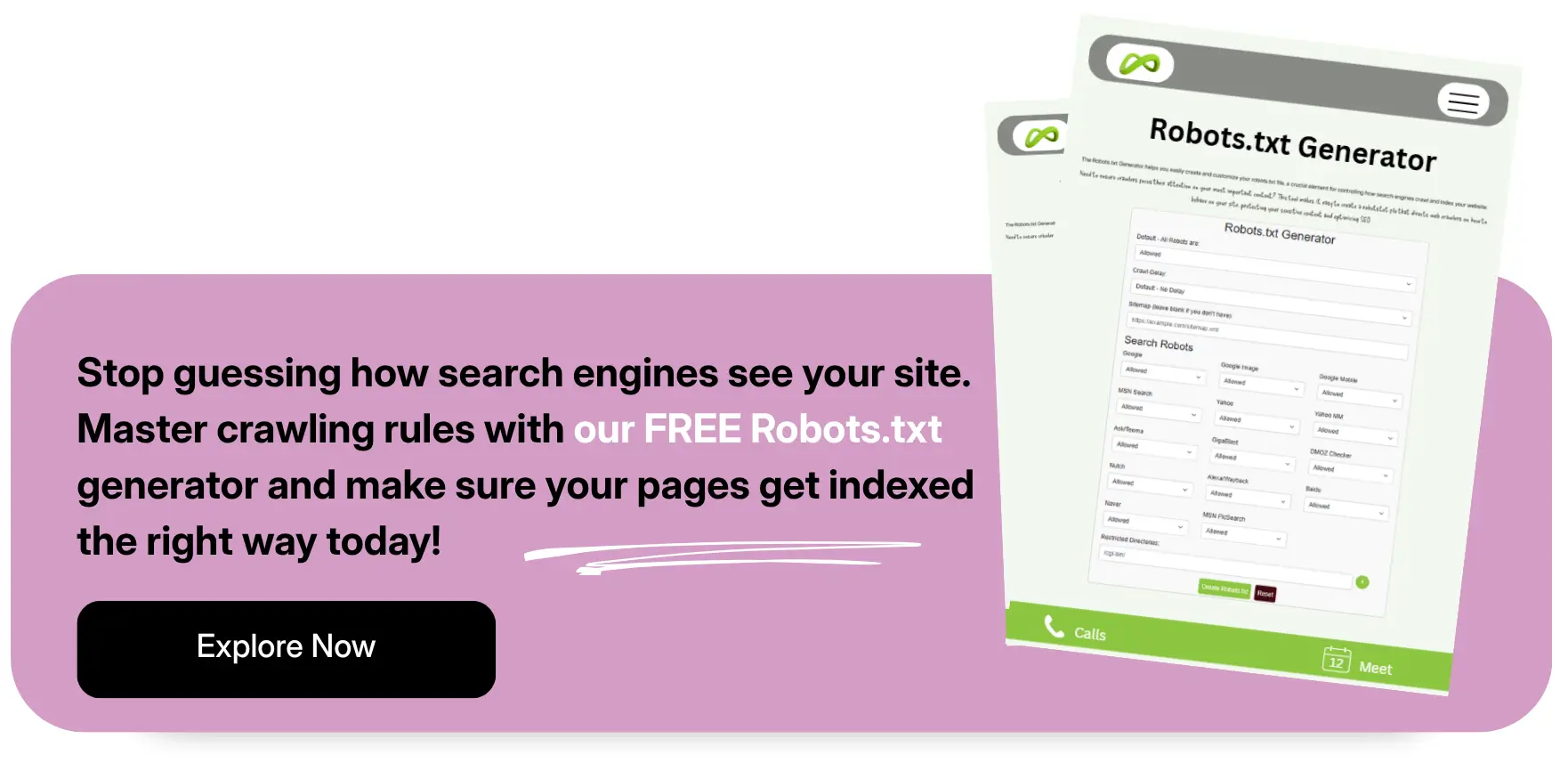
When and How to Update Robots.txt?
When and How to Update Robots.txt?
When and How to Update Robots.txt?
Update your robots.txt whenever:
You change how your website is set up.
You put in some new pages or add more sections.
You change your SEO plan.
To update:
Open the file with a text editor and make the needed changes.
Put the file in your site’s main folder.
Check it using Google Search Console to make sure it works.
Be sure you are not stopping important pages from being reached.
Ask Google to crawl your site again.
Look at crawl reports often to see how things are going.
Update your robots.txt whenever:
You change how your website is set up.
You put in some new pages or add more sections.
You change your SEO plan.
To update:
Open the file with a text editor and make the needed changes.
Put the file in your site’s main folder.
Check it using Google Search Console to make sure it works.
Be sure you are not stopping important pages from being reached.
Ask Google to crawl your site again.
Look at crawl reports often to see how things are going.
Update your robots.txt whenever:
You change how your website is set up.
You put in some new pages or add more sections.
You change your SEO plan.
To update:
Open the file with a text editor and make the needed changes.
Put the file in your site’s main folder.
Check it using Google Search Console to make sure it works.
Be sure you are not stopping important pages from being reached.
Ask Google to crawl your site again.
Look at crawl reports often to see how things are going.
Final Thoughts
Final Thoughts
Final Thoughts
Think of robots.txt as the gatekeeper of your website. When configured correctly, it helps search engines focus on what matters most, saving crawl budget and improving your chances of ranking higher. In a competitive digital landscape, every detail counts—and robots.txt is one of those details that can make or break your SEO performance. Start optimizing now to ensure your site stands out where it matters.
Think of robots.txt as the gatekeeper of your website. When configured correctly, it helps search engines focus on what matters most, saving crawl budget and improving your chances of ranking higher. In a competitive digital landscape, every detail counts—and robots.txt is one of those details that can make or break your SEO performance. Start optimizing now to ensure your site stands out where it matters.
Think of robots.txt as the gatekeeper of your website. When configured correctly, it helps search engines focus on what matters most, saving crawl budget and improving your chances of ranking higher. In a competitive digital landscape, every detail counts—and robots.txt is one of those details that can make or break your SEO performance. Start optimizing now to ensure your site stands out where it matters.
Frequently Asked Questions (FAQs)
Frequently Asked Questions
Frequently Asked Questions
How does robots.txt differ from a sitemap, and why do I need both?
A sitemap is a list of all URLs you want to search engines to index, helping them discover content faster. Robots.txt does the opposite, it tells crawlers which pages do not crawl. Using both ensures that important pages are discoverable while low-value or sensitive content is blocked, optimizing crawl efficiency.
How can robots.txt affect SEO?
You should expect a structured process that includes onboarding, goal setting, strategy development, regular communication, execution of campaigns, and performance reporting. A good agency will act as a partner collaborating with you to understand your business, crafting a custom plan, and keeping you informed about progress and results.
How often should I update my robots.txt file?
Vanity metrics are data points that look impressive but don’t directly impact your bottom line, such as social media likes, page views, or email open rates. While they can indicate visibility, they’re not strong indicators of business success. What’s more important are actionable metrics like lead quality, conversion rate, and return on investment (ROI). Looking for more details? Contact us today before your competitors do.
What does “Disallow” mean in robots.txt?
High traffic without conversions often points to deeper issues such as: Poor targeting (the wrong audience is visiting), weak calls-to-action or unclear messaging, website usability issues or slow load times, lack of trust signals (like reviews or security).
Your marketing should not just drive visits; it should drive the right visitors and guide them to act.
Does robots.txt prevent pages from appearing in Google search results?
You’ll know it’s working when you see measurable progress toward your business goals, more qualified leads, better engagement, increased sales, or stronger ROI. Regular reports, clear KPIs, and consistent communication from your agency are key to evaluating success.
How does robots.txt affect crawl budget for large websites?
Organic marketing (like SEO, blogging, and social media engagement) often takes 3 to 6 months to start showing results and may take 6–12 months for significant impact. It builds trust and authority over time, and while slower than paid marketing, it often yields more sustainable growth.
What are the most common mistakes to avoid when using robots.txt?
A good marketing report should cover: Key performance indicators (KPIs) tied to your goals, traffic and conversion data, campaign performance summaries, ROI or cost-per-lead/acquisition, insights and recommendations for improvement, clear next steps or action items.
It should be easy to understand, jargon-free, and focus on outcomes. Learn more—how we drive revenue?
How does robots.txt differ from a sitemap, and why do I need both?
A sitemap is a list of all URLs you want to search engines to index, helping them discover content faster. Robots.txt does the opposite, it tells crawlers which pages do not crawl. Using both ensures that important pages are discoverable while low-value or sensitive content is blocked, optimizing crawl efficiency.
How can robots.txt affect SEO?
You should expect a structured process that includes onboarding, goal setting, strategy development, regular communication, execution of campaigns, and performance reporting. A good agency will act as a partner collaborating with you to understand your business, crafting a custom plan, and keeping you informed about progress and results.
How often should I update my robots.txt file?
Vanity metrics are data points that look impressive but don’t directly impact your bottom line, such as social media likes, page views, or email open rates. While they can indicate visibility, they’re not strong indicators of business success. What’s more important are actionable metrics like lead quality, conversion rate, and return on investment (ROI). Looking for more details? Contact us today before your competitors do.
What does “Disallow” mean in robots.txt?
High traffic without conversions often points to deeper issues such as: Poor targeting (the wrong audience is visiting), weak calls-to-action or unclear messaging, website usability issues or slow load times, lack of trust signals (like reviews or security).
Your marketing should not just drive visits; it should drive the right visitors and guide them to act.
Does robots.txt prevent pages from appearing in Google search results?
You’ll know it’s working when you see measurable progress toward your business goals, more qualified leads, better engagement, increased sales, or stronger ROI. Regular reports, clear KPIs, and consistent communication from your agency are key to evaluating success.
How does robots.txt affect crawl budget for large websites?
Organic marketing (like SEO, blogging, and social media engagement) often takes 3 to 6 months to start showing results and may take 6–12 months for significant impact. It builds trust and authority over time, and while slower than paid marketing, it often yields more sustainable growth.
What are the most common mistakes to avoid when using robots.txt?
A good marketing report should cover: Key performance indicators (KPIs) tied to your goals, traffic and conversion data, campaign performance summaries, ROI or cost-per-lead/acquisition, insights and recommendations for improvement, clear next steps or action items.
It should be easy to understand, jargon-free, and focus on outcomes. Learn more—how we drive revenue?
How does robots.txt differ from a sitemap, and why do I need both?
A sitemap is a list of all URLs you want to search engines to index, helping them discover content faster. Robots.txt does the opposite, it tells crawlers which pages do not crawl. Using both ensures that important pages are discoverable while low-value or sensitive content is blocked, optimizing crawl efficiency.
How can robots.txt affect SEO?
You should expect a structured process that includes onboarding, goal setting, strategy development, regular communication, execution of campaigns, and performance reporting. A good agency will act as a partner collaborating with you to understand your business, crafting a custom plan, and keeping you informed about progress and results.
How often should I update my robots.txt file?
Vanity metrics are data points that look impressive but don’t directly impact your bottom line, such as social media likes, page views, or email open rates. While they can indicate visibility, they’re not strong indicators of business success. What’s more important are actionable metrics like lead quality, conversion rate, and return on investment (ROI). Looking for more details? Contact us today before your competitors do.
What does “Disallow” mean in robots.txt?
High traffic without conversions often points to deeper issues such as: Poor targeting (the wrong audience is visiting), weak calls-to-action or unclear messaging, website usability issues or slow load times, lack of trust signals (like reviews or security).
Your marketing should not just drive visits; it should drive the right visitors and guide them to act.
Does robots.txt prevent pages from appearing in Google search results?
You’ll know it’s working when you see measurable progress toward your business goals, more qualified leads, better engagement, increased sales, or stronger ROI. Regular reports, clear KPIs, and consistent communication from your agency are key to evaluating success.
How does robots.txt affect crawl budget for large websites?
Organic marketing (like SEO, blogging, and social media engagement) often takes 3 to 6 months to start showing results and may take 6–12 months for significant impact. It builds trust and authority over time, and while slower than paid marketing, it often yields more sustainable growth.
What are the most common mistakes to avoid when using robots.txt?
A good marketing report should cover: Key performance indicators (KPIs) tied to your goals, traffic and conversion data, campaign performance summaries, ROI or cost-per-lead/acquisition, insights and recommendations for improvement, clear next steps or action items.
It should be easy to understand, jargon-free, and focus on outcomes. Learn more—how we drive revenue?
How does robots.txt differ from a sitemap, and why do I need both?
A sitemap is a list of all URLs you want to search engines to index, helping them discover content faster. Robots.txt does the opposite, it tells crawlers which pages do not crawl. Using both ensures that important pages are discoverable while low-value or sensitive content is blocked, optimizing crawl efficiency.
How can robots.txt affect SEO?
You should expect a structured process that includes onboarding, goal setting, strategy development, regular communication, execution of campaigns, and performance reporting. A good agency will act as a partner collaborating with you to understand your business, crafting a custom plan, and keeping you informed about progress and results.
How often should I update my robots.txt file?
Vanity metrics are data points that look impressive but don’t directly impact your bottom line, such as social media likes, page views, or email open rates. While they can indicate visibility, they’re not strong indicators of business success. What’s more important are actionable metrics like lead quality, conversion rate, and return on investment (ROI). Looking for more details? Contact us today before your competitors do.
What does “Disallow” mean in robots.txt?
High traffic without conversions often points to deeper issues such as: Poor targeting (the wrong audience is visiting), weak calls-to-action or unclear messaging, website usability issues or slow load times, lack of trust signals (like reviews or security).
Your marketing should not just drive visits; it should drive the right visitors and guide them to act.
Does robots.txt prevent pages from appearing in Google search results?
You’ll know it’s working when you see measurable progress toward your business goals, more qualified leads, better engagement, increased sales, or stronger ROI. Regular reports, clear KPIs, and consistent communication from your agency are key to evaluating success.
How does robots.txt affect crawl budget for large websites?
Organic marketing (like SEO, blogging, and social media engagement) often takes 3 to 6 months to start showing results and may take 6–12 months for significant impact. It builds trust and authority over time, and while slower than paid marketing, it often yields more sustainable growth.
What are the most common mistakes to avoid when using robots.txt?
A good marketing report should cover: Key performance indicators (KPIs) tied to your goals, traffic and conversion data, campaign performance summaries, ROI or cost-per-lead/acquisition, insights and recommendations for improvement, clear next steps or action items.
It should be easy to understand, jargon-free, and focus on outcomes. Learn more—how we drive revenue?
How does robots.txt differ from a sitemap, and why do I need both?
A sitemap is a list of all URLs you want to search engines to index, helping them discover content faster. Robots.txt does the opposite, it tells crawlers which pages do not crawl. Using both ensures that important pages are discoverable while low-value or sensitive content is blocked, optimizing crawl efficiency.
How can robots.txt affect SEO?
You should expect a structured process that includes onboarding, goal setting, strategy development, regular communication, execution of campaigns, and performance reporting. A good agency will act as a partner collaborating with you to understand your business, crafting a custom plan, and keeping you informed about progress and results.
How often should I update my robots.txt file?
Vanity metrics are data points that look impressive but don’t directly impact your bottom line, such as social media likes, page views, or email open rates. While they can indicate visibility, they’re not strong indicators of business success. What’s more important are actionable metrics like lead quality, conversion rate, and return on investment (ROI). Looking for more details? Contact us today before your competitors do.
What does “Disallow” mean in robots.txt?
High traffic without conversions often points to deeper issues such as: Poor targeting (the wrong audience is visiting), weak calls-to-action or unclear messaging, website usability issues or slow load times, lack of trust signals (like reviews or security).
Your marketing should not just drive visits; it should drive the right visitors and guide them to act.
Does robots.txt prevent pages from appearing in Google search results?
You’ll know it’s working when you see measurable progress toward your business goals, more qualified leads, better engagement, increased sales, or stronger ROI. Regular reports, clear KPIs, and consistent communication from your agency are key to evaluating success.
How does robots.txt affect crawl budget for large websites?
Organic marketing (like SEO, blogging, and social media engagement) often takes 3 to 6 months to start showing results and may take 6–12 months for significant impact. It builds trust and authority over time, and while slower than paid marketing, it often yields more sustainable growth.
What are the most common mistakes to avoid when using robots.txt?
A good marketing report should cover: Key performance indicators (KPIs) tied to your goals, traffic and conversion data, campaign performance summaries, ROI or cost-per-lead/acquisition, insights and recommendations for improvement, clear next steps or action items.
It should be easy to understand, jargon-free, and focus on outcomes. Learn more—how we drive revenue?
Robots.txt Tells Search Engines Which Pages to Crawl or Skip.
Robots.txt Tells Search Engines Which Pages to Crawl or Skip.
Robots.txt Tells Search Engines Which Pages to Crawl or Skip.
Optimize your robots.txt to protect sensitive pages, improve crawl efficiency, and support better search performance.
Optimize your robots.txt to protect sensitive pages, improve crawl efficiency, and support better search performance.
Optimize your robots.txt to protect sensitive pages, improve crawl efficiency, and support better search performance.
4.9/5 Ratings!
4.9/5 Ratings!
4.9/5 Ratings!
4.9/5 Ratings!
4.9/5 Ratings!
Share this article

Related Resources
Latest Blogs






Don’t miss our revenue growth tips!
Don’t miss our revenue growth tips!
Don’t miss our revenue growth tips!
Get expert marketing tips—straight to your inbox, like thousands of happy clients.
Get expert marketing tips—straight to your inbox, like thousands of happy clients.
Latest Blogs

























Ready to speak with an expert?
Data-Driven Marketing Agency That Elevates ROI
Websites Designed & Optimized to Convert
$280M+
Client Revenue Driven & Growing Strong
Discover how to skyrocket
your revenue today!


Trusted by 1000+ Owners!
Want to skyrocket revenue?
4.9/5 Ratings!
Ready to speak with an expert?
Data-Driven Marketing Agency That Elevates ROI
Websites Designed & Optimized to Convert
$280M+
Client Revenue Driven & Growing Strong
Discover how to skyrocket
your revenue today!
Trusted by 1000+ Owners!
Want to skyrocket revenue?
4.9/5 Ratings!
Ready to speak with an expert?
Data-Driven Marketing Agency That Elevates ROI
Websites Designed & Optimized to Convert
$280M+
Client Revenue Driven & Growing Strong
Want to skyrocket
revenue?
Trusted by 1000+ Owners!