Why a CMS is the Smartest Way to Manage Websites?
Why a CMS is the Smartest Way to Manage Websites?
Content Management System
Content Management System
Content Management System
A CMS (Content Management System) is software that lets users create, manage, and publish digital content easily, without needing coding skills. It offers a simple interface for building and maintaining websites, blogs, and more.
A CMS (Content Management System) is software that lets users create, manage, and publish digital content easily, without needing coding skills. It offers a simple interface for building and maintaining websites, blogs, and more.


Table of Content
Case Studies


Manage Your Website Content Smarter with the Right CMS
Manage Your Website Content Smarter with the Right CMS



4.9/5 Ratings!

Prakash Choudhary
Prakash Choudhary
6 Min
6 Min
Oct 06, 2025
Oct 06, 2025
Content management systems have made building and running websites simple. You do not need to be a tech expert to create, change, or set up web pages. A good CMS helps your brand stay the same everywhere. It also helps your team get things done faster. People can find your blog, online shop, or company site more easily with the right CMS.
Content management systems have made building and running websites simple. You do not need to be a tech expert to create, change, or set up web pages. A good CMS helps your brand stay the same everywhere. It also helps your team get things done faster. People can find your blog, online shop, or company site more easily with the right CMS.
What Does CMS Mean?
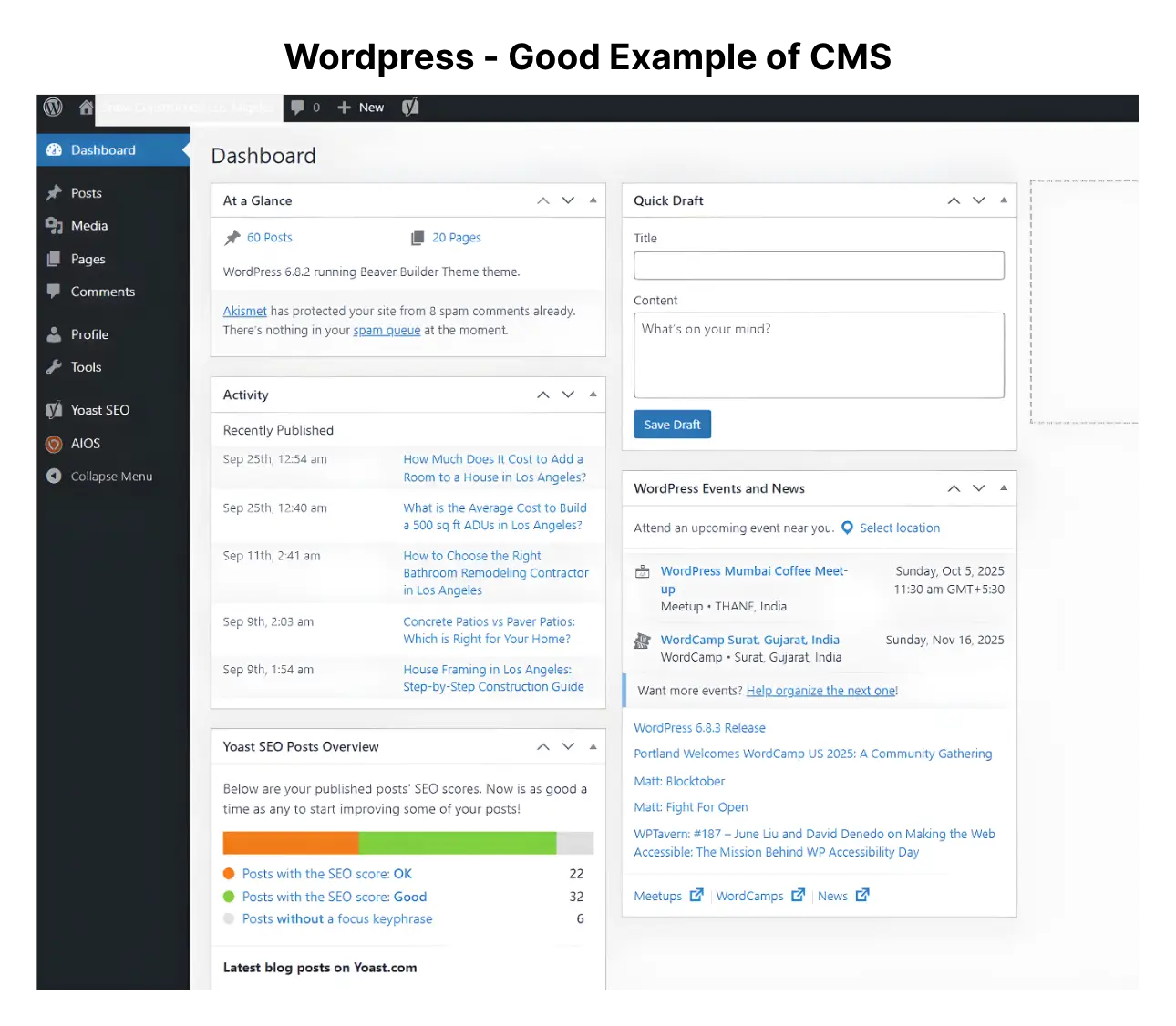
A CMS, which stands for Content Management System, is a kind of software. It helps people make and handle content for a website without needing to know how to code. Some popular CMS platforms are WordPress, Joomla, Drupal, and Shopify. These all have dashboards that are easy to use. You can change how your site looks with different themes, and you can add more features with plugins.
A CMS, which stands for Content Management System, is a kind of software. It helps people make and handle content for a website without needing to know how to code. Some popular CMS platforms are WordPress, Joomla, Drupal, and Shopify. These all have dashboards that are easy to use. You can change how your site looks with different themes, and you can add more features with plugins.
Main Features
Main Features
•
•
Roles and permissions for users
Roles and permissions for users
•
•
Templates and add-ons/plugins
Templates and add-ons/plugins
Why Use a CMS?
Reason to Use CMS
Reason to Use CMS
Reason to Use CMS
Reason to Use CMS
Explanation
Explanation
Explanation
Explanation
Example/Benefit
Example/Benefit
Example/Benefit
Example/Benefit
Easy to Use
Easy to Use
Easy to Use
User-friendly interface that requires no coding knowledge.
User-friendly interface that requires no coding knowledge.
User-friendly interface that requires no coding knowledge.
Anyone can update website content quickly.
Anyone can update website content quickly.
Anyone can update website content quickly.
Collaboration
Collaboration
Collaboration
Multiple users can work together on content creation and management.
Multiple users can work together on content creation and management.
Multiple users can work together on content creation and management.
Marketing, design, and IT teams can work in one system.
Marketing, design, and IT teams can work in one system.
Marketing, design, and IT teams can work in one system.
Faster Updates
Faster Updates
Faster Updates
Content can be updated instantly without developer support.
Content can be updated instantly without developer support.
Content can be updated instantly without developer support.
Quick changes to blogs, product pages, or landing pages.
Quick changes to blogs, product pages, or landing pages.
Quick changes to blogs, product pages, or landing pages.
Design Flexibility
Design Flexibility
Design Flexibility
Offers templates and themes to customize site design.
Offers templates and themes to customize site design.
Offers templates and themes to customize site design.
Create professional-looking sites without a designer.
Create professional-looking sites without a designer.
Create professional-looking sites without a designer.
Scalability
Scalability
Scalability
Can handle growing content and traffic as the business expands.
Can handle growing content and traffic as the business expands.
Can handle growing content and traffic as the business expands.
Start with a small blog and scale to a full e-commerce site.
Start with a small blog and scale to a full e-commerce site.
Start with a small blog and scale to a full e-commerce site.
Cost-Effective
Cost-Effective
Cost-Effective
Reduces need for constant developer involvement.
Reduces need for constant developer involvement.
Reduces need for constant developer involvement.
Saves money on website management and maintenance.
Saves money on website management and maintenance.
Saves money on website management and maintenance.
Security Features
Security Features
Security Features
Regular updates and security plugins protect against threats.
Regular updates and security plugins protect against threats.
Regular updates and security plugins protect against threats.
Protects sensitive customer and business data.
Protects sensitive customer and business data.
Protects sensitive customer and business data.
CMS platforms are made for people who don't have a lot of tech skills. You can change text, put up pictures, adjust your SEO settings, and plan out posts from a website.
CMS platforms are made for people who don't have a lot of tech skills. You can change text, put up pictures, adjust your SEO settings, and plan out posts from a website.
Main Parts of CMS
1. Governance and Workflow
1. Governance and Workflow
•
•
Give people different roles like contributor, editor, and administrator.
Give people different roles like contributor, editor, and administrator.
•
•
Use the draft, review, approval, and publish steps to help make things easy for you.
Use the draft, review, approval, and publish steps to help make things easy for you.
2. The structure of the Content
2. The structure of the Content
•
•
Use tags and categories to help organize things so they are easy to understand.
Use tags and categories to help organize things so they are easy to understand.
•
•
Make content types that you can use many times, like blog posts, author bios, and testimonials.
Make content types that you can use many times, like blog posts, author bios, and testimonials.
3. SEO and Finding
3. SEO and Finding
•
•
Make sure your titles, descriptions, and URLs are easy to read and match what people search for. This will help your site show up when they look for it. A good title, clear description, and a simple URL can make the site easier to find and use.
Make sure your titles, descriptions, and URLs are easy to read and match what people search for. This will help your site show up when they look for it. A good title, clear description, and a simple URL can make the site easier to find and use.
•
•
Add schema markup to give more info in Google results.
Add schema markup to give more info in Google results.
•
•
To make indexing better, use automated sitemaps and keep your URLs clean.
To make indexing better, use automated sitemaps and keep your URLs clean.
4. Managing the Media
4. Managing the Media
•
•
You need to upload photos and videos that look good. Make sure they are from legal places.
You need to upload photos and videos that look good. Make sure they are from legal places.
•
•
For good SEO and to help people use your site, add alt text that tells what an image shows.
For good SEO and to help people use your site, add alt text that tells what an image shows.
•
•
Add GIFs or fun things people can click on to help get them involved.
Add GIFs or fun things people can click on to help get them involved.
Best Ways to Make Your CMS Work
•
•
Clear Roles for Users: Make sure you only let people make changes that you want. Limit what users can do by setting their roles. This helps keep your system safe. People only get to do what you need from them, so there are no surprises. If someone should not change something, their access can be blocked. This way, you have better control.
Clear Roles for Users: Make sure you only let people make changes that you want. Limit what users can do by setting their roles. This helps keep your system safe. People only get to do what you need from them, so there are no surprises. If someone should not change something, their access can be blocked. This way, you have better control.
•
•
Consistent Naming: Make sure to have clear groups and easy-to-understand tags for your files.
Consistent Naming: Make sure to have clear groups and easy-to-understand tags for your files.
•
•
•
•
Responsive Design: Make sure that all templates look good and be easy to use on mobile devices.
Responsive Design: Make sure that all templates look good and be easy to use on mobile devices.
•
•
Regular Checks: Go over the structure of the content from time to time to make it better.
Regular Checks: Go over the structure of the content from time to time to make it better.
Final Thoughts
A CMS helps make it easy for people to manage a website. It also helps a business get ready to grow, work together, and be seen more online. When a company picks the right platform, sorts its content in a clear way, and follows the best ways to do things, it makes sure its website is ready for changes and stays ahead. This also helps with seo and helps them grow and get found by more people.
A CMS helps make it easy for people to manage a website. It also helps a business get ready to grow, work together, and be seen more online. When a company picks the right platform, sorts its content in a clear way, and follows the best ways to do things, it makes sure its website is ready for changes and stays ahead. This also helps with seo and helps them grow and get found by more people.
Frequently Asked Questions (FAQs)
Frequently Asked Questions
How do CMS platforms help non-technical users manage websites?

CMS platforms allow users to create, edit, and organize content without needing coding knowledge. Intuitive dashboards, drag-and-drop editors, and pre-built templates simplify the website management process, making it accessible to anyone in marketing, sales, or business management.
Can I switch CMS platforms if my business grows?
You should expect a structured process that includes onboarding, goal setting, strategy development, regular communication, execution of campaigns, and performance reporting. A good agency will act as a partner collaborating with you to understand your business, crafting a custom plan, and keeping you informed about progress and results.
How does a CMS help with SEO beyond plugins?
Vanity metrics are data points that look impressive but don’t directly impact your bottom line, such as social media likes, page views, or email open rates. While they can indicate visibility, they’re not strong indicators of business success. What’s more important are actionable metrics like lead quality, conversion rate, and return on investment (ROI). Looking for more details? Contact us today before your competitors do.
How can a CMS improve website load speed?
High traffic without conversions often points to deeper issues such as: Poor targeting (the wrong audience is visiting), weak calls-to-action or unclear messaging, website usability issues or slow load times, lack of trust signals (like reviews or security).
Your marketing should not just drive visits; it should drive the right visitors and guide them to act.
Can I customize a CMS without coding knowledge?
You’ll know it’s working when you see measurable progress toward your business goals, more qualified leads, better engagement, increased sales, or stronger ROI. Regular reports, clear KPIs, and consistent communication from your agency are key to evaluating success.
Can I integrate e-commerce with my CMS?
Organic marketing (like SEO, blogging, and social media engagement) often takes 3 to 6 months to start showing results and may take 6–12 months for significant impact. It builds trust and authority over time, and while slower than paid marketing, it often yields more sustainable growth.
Can a CMS handle large-scale websites with thousands of pages?
A good marketing report should cover: Key performance indicators (KPIs) tied to your goals, traffic and conversion data, campaign performance summaries, ROI or cost-per-lead/acquisition, insights and recommendations for improvement, clear next steps or action items.
It should be easy to understand, jargon-free, and focus on outcomes. Learn more—how we drive revenue?
How do CMS platforms help non-technical users manage websites?
CMS platforms allow users to create, edit, and organize content without needing coding knowledge. Intuitive dashboards, drag-and-drop editors, and pre-built templates simplify the website management process, making it accessible to anyone in marketing, sales, or business management.
Can I switch CMS platforms if my business grows?
You should expect a structured process that includes onboarding, goal setting, strategy development, regular communication, execution of campaigns, and performance reporting. A good agency will act as a partner collaborating with you to understand your business, crafting a custom plan, and keeping you informed about progress and results.
How does a CMS help with SEO beyond plugins?
Vanity metrics are data points that look impressive but don’t directly impact your bottom line, such as social media likes, page views, or email open rates. While they can indicate visibility, they’re not strong indicators of business success. What’s more important are actionable metrics like lead quality, conversion rate, and return on investment (ROI). Looking for more details? Contact us today before your competitors do.
How can a CMS improve website load speed?
High traffic without conversions often points to deeper issues such as: Poor targeting (the wrong audience is visiting), weak calls-to-action or unclear messaging, website usability issues or slow load times, lack of trust signals (like reviews or security).
Your marketing should not just drive visits; it should drive the right visitors and guide them to act.
Can I customize a CMS without coding knowledge?
You’ll know it’s working when you see measurable progress toward your business goals, more qualified leads, better engagement, increased sales, or stronger ROI. Regular reports, clear KPIs, and consistent communication from your agency are key to evaluating success.
Can I integrate e-commerce with my CMS?
Organic marketing (like SEO, blogging, and social media engagement) often takes 3 to 6 months to start showing results and may take 6–12 months for significant impact. It builds trust and authority over time, and while slower than paid marketing, it often yields more sustainable growth.
Can a CMS handle large-scale websites with thousands of pages?
A good marketing report should cover: Key performance indicators (KPIs) tied to your goals, traffic and conversion data, campaign performance summaries, ROI or cost-per-lead/acquisition, insights and recommendations for improvement, clear next steps or action items.
It should be easy to understand, jargon-free, and focus on outcomes. Learn more—how we drive revenue?
Manage Your Website Content Smarter with the Right CMS
Manage Your Website Content Smarter with the Right CMS
The right CMS improves website management, enhances scalability, and helps teams maintain consistent content.
The right CMS improves website management, enhances scalability, and helps teams maintain consistent content.
4.9/5 Ratings!
Share this article

Related Resources
Latest Blogs





Don’t miss our revenue growth tips!
Don’t miss our revenue growth tips!
Don’t miss our revenue growth tips!
Get expert marketing tips—straight to your inbox, like thousands of happy clients.
Get expert marketing tips—straight to your inbox, like thousands of happy clients.
Latest Blogs





















Ready to speak with an expert?
Data-Driven Marketing Agency That Elevates ROI
1100+
Websites Designed & Optimized to Convert
$280M+
Client Revenue Driven & Growing Strong
Discover how to skyrocket
your revenue today!
Trusted by 1000+ Owners!
Ready to speak with an expert?
Data-Driven Marketing Agency That Elevates ROI
1100+
Websites Designed & Optimized to Convert
$280M+
Client Revenue Driven & Growing Strong
Discover how to skyrocket
your revenue today!
Trusted by 1000+ Owners!
Want to skyrocket revenue?
4.9/5 Ratings!
Ready to speak with an expert?
Data-Driven Marketing Agency That Elevates ROI
1100+
Websites Designed & Optimized to Convert
$280M+
Client Revenue Driven & Growing Strong
Want to skyrocket
revenue?
Trusted by 1000+ Owners!
Call
Meet